
Latest News from the Billy Grace team

Feature update
Product update
Product update July 2024

Shared by Charlotte
• August 08, 2024
Hey there,
I hope you're enjoying the summer sunshine! ☀️ It's August, and we have a huge lineup of updates to share with you! 🌊🌴
Read on to learn what we released in July 2024.
👻&⛰️ NEW INTEGRATIONS: SnapChat & MNTN
Two new integrations: SnapChat and MNTN! Manage and optimize SnapChat ad campaigns directly from Billy Grace to reach a younger, engaged audience. For our US bases clients, we added MNTN to enhance connected TV advertising and extend reach.
Go to the integrations page and authorize SnapChat and MNTN.

🌟 Expanded Integrations in Automations: Criteo, Reddit and LinkedIn
We’ve expanded our automations capabilities with Criteo, Reddit and LinkedIn. These additions enable you to setup more automations across a variety of platforms, making it easier to optimize your advertising efforts and reach your target audience effectively.
Please note that only budget recommendations for these platforms are available. Soon we will launch the automatic updating feature for these channels.

📊 Added More Metrics to Paid Performance Table
We’ve enhanced the Paid Performance table with new video metrics:
- Video 100%
- Video 75%
- Video 50%
- Video 25%
- L90D Frequency*
- L90D Reach**
*L90D Frequency will be shown at the source, campaign, and adset levels, representing average values over the selected period.
**L90D Reach will be shown at campaign and adset levels, similarly averaged over the selected period. This provides a more detailed view of how your ads are performing over time.

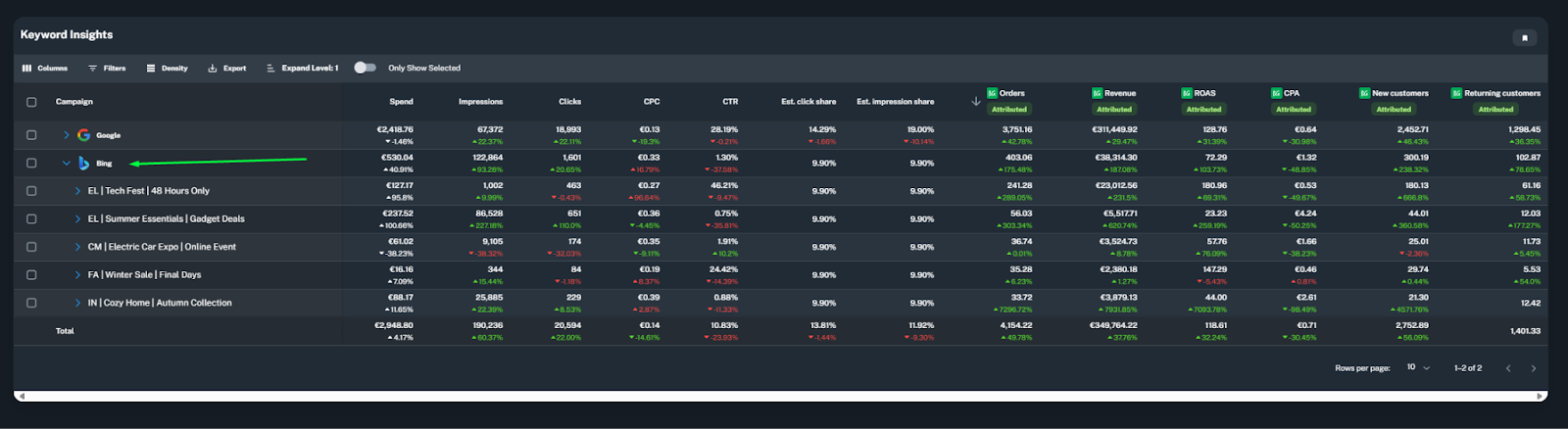
🔍 Added Bing Results to Keywords & Products Report
We’ve included Bing results in the Keywords & Products report, giving you an extensive view of your search performance across different platforms. This helps you to optimize your keywords more effectively.
⚙️ Added Advanced Mode in Automation Form - Max & Min Budget Settings
Take control of your budget with the new advanced mode in the Automation form. You can now set maximum and minimum budget limits when using the increase/decrease budget automation rule. This ensures your campaigns stay within desired financial boundaries, giving you more flexibility and precision in managing your ad spend.

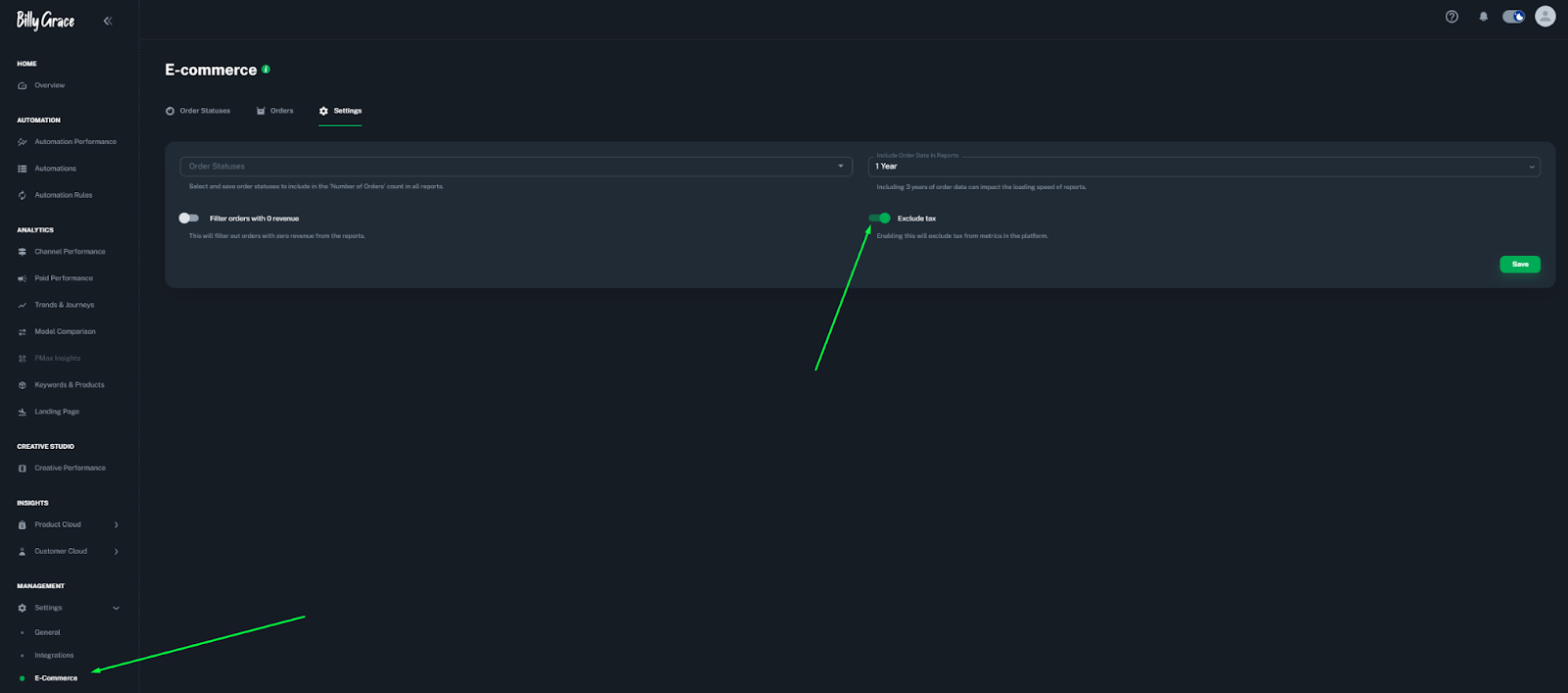
💡 Added Exclude/Include VAT (Btw in Dutch) Option on E-commerce Page
For better financial tracking and reporting, we’ve added an option to exclude or include VAT from metrics on the E-commerce page. *connection with e-commerce platform required
Additional amazing improvements 🚀
- Added CVR to Landing Page report
- Possibility to share data with us by using SFTP
- Added a benchmark functionality available in Creative Performance
- Added YTD and Moving Annual (last 365 days) total to the date picker
- 🛠️ Stay tuned! We are actively working behind the scenes on integrating with Xandr. More updates are coming soon!

Feature update
Product update
Product update June 2024
Shared by Charlotte
• July 10, 2024
Hey there,
Hopefully, everyone had an amazing start to the summer! 🌞 It's July, and as the days grow longer, so does our lists with updates! 🌻🌊
Read on to discover all the improvements we've made in June 2024.
🌐 NEW INTEGRATION: CM360
We’re thrilled to announce our integration with CM360! This will enable you to streamline your ad campaigns and gain deeper insights into your performance metrics. Elevate your marketing strategies with ease!
Go to the authorization page and authorize CM360. Good to know; if you are serving your DV360 ads via CM360 you should use the CM360 integration, and if you are serving the ads via DV360, you can integrate with DV360.

🌟 Added Holidays and Cloud Cover Variables to Automation Rules!
We’ve expanded our Automation Rules with two new variables: Holidays and Cloud Cover. Optimize your campaigns during key holidays and maximize results. Additionally, optimize your ads based on weather conditions with the new Cloud Cover variable. Whether it’s sunny or cloudy, Billy Grace ensures your budgets are optimized to the day’s forecast.
* Current supported holiday countries are: The Netherlands, Spain, Monaco, New Zealand, United Kingdom, Belgium, Canada, Ireland, Australia, and the United States

📊 Improved table grouping feature
We have improved the table grouping feature in the Paid Performance report. This enhancement ensures that your grouped data loads efficiently, and only refreshing after you click away the table grouping menu.

🛒📈 Added all E-commerce metrics for Magento, WooCommerce and Salesforce
We have added all e-commerce metrics for clients using Magento, WooCommerce and Salesforce. For example, you can now find more metrics on the overview page regarding new and returning customers and attributed revenue.
You can select these metrics in the dropdown menu to add them to your overview dashboard.

Additional amazing improvements 🚀
- 🛠️ Stay tuned! We are actively working behind the scenes on integrating with Channable for Profit metrics, Snapchat, Xandr and MNTN. More updates are coming soon!

Feature update
Product update
Product update May 2024
Shared by Charlotte
• June 11, 2024
Hey there,
It’s time for our monthly update, with new features and enhancements to our platform! 🚀
Read on to discover all the improvements we've made in May 2024.
🔗 Multi-account support for DV360
Adding multiple DV360 accounts to one Billy Grace account is now possible, creating a total overview of all advertising efforts. You can select multiple account IDs or even add an extra MCC account.
Do you have multiple ad accounts that you want to connect to Billy Grace? Please let us know via the in-app messenger so we can activate this for you!

🔍 Added keyword match types
Introducing keyword match types for enhanced insights in the Keywords & Products report.
- Broad Match: Billy Grace
- Exact Match: [Billy Grace]
- Phrase Match: "Billy Grace"

🛍️ NEW: E-commerce page for E-commerce clients
We have added a new page for E-commerce clients where you can get insights into the various order statuses we receive on which we calculate our metrics. In the “Settings” tab, you can choose which order statuses you want to include or not.

Additional amazing improvements 🚀
- Added a switch button to enable additional E-commerce metrics (for Shopify clients only). You can find this setting when you go to Settings > General > Metrics
- Speed improvements: The last month, our team worked very hard on improving the speed of Billy Grace so you can experience faster load times and smoother performance!
- 🛠️ Stay tuned! We are actively working behind the scenes on integrating with Channable for Profit metrics. More updates coming soon!

Feature update
Product update
Product update April 2024

Shared by Lily
• May 08, 2024
Hey there,
It’s time for our monthly update, with many new features and enhancements to our platform! 🚀
Read on to discover all improvements we've made in April 2024.
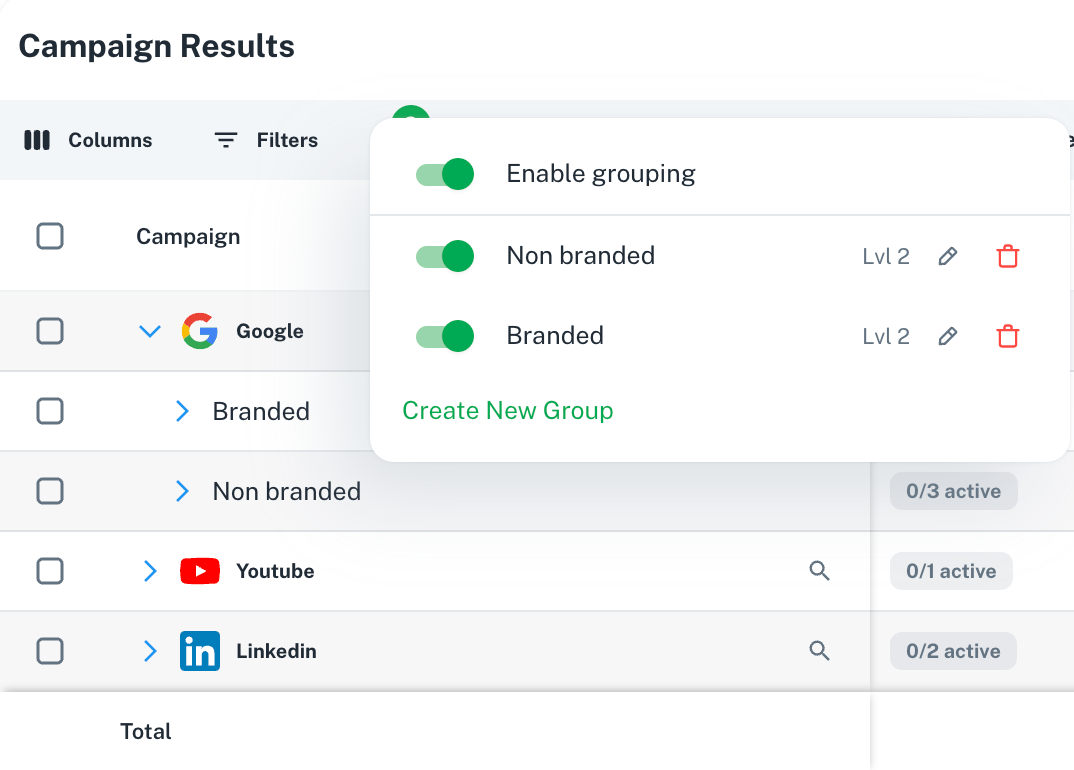
✂️ Enhanced Table Grouping in Paid Performance
Exciting news! You can now use advanced campaign grouping capabilities within Billy Grace. Always wanted to effortlessly organize specific campaigns across multiple or within channels? Now you can!
Separate your branded and non-branded campaigns seamlessly. Group campaigns promoting the same product category for streamlined analysis. Want to track spending? Identify campaigns that have spent over $100 with just a few clicks.
With over 20 variables to choose from, you can tailor your campaign analysis table to your needs.
Using grouping will give you more control of your campaign analysis and gain deeper insights as it will also introduce a new total row per group.
🟠 Welcome Reddit Integration
Expand your reach with our latest integration: Reddit! Seamlessly connect to this dynamic platform and incorporate Reddit into your marketing strategies to engage with new audiences.

🔵 Channel Performance Icons
Visualize performance at a glance! We've added icons to represent different channels in Channel Performance, enhancing clarity and usability.
👏 New & Returning Customers Metrics in Automation
Optimize your strategies with new insights! Now available in Automation forms for Magento & WooCommerce, track New & Returning Customers metrics to refine your targeting and engagement strategies.
🔐 New User Role - Read Only
Introducing the Read Only user role! Now you can limit access to analytics data pages and make them read only, ensuring secure and controlled viewing without the ability to make changes to automations.
✔️ LinkedIn UTM Updated
LinkedIn started to support dynamic parameters, so you no longer have to manually add your ID’s. Please update!
Additional amazing improvements 🚀
- We’ve added checkboxes and a select current search option to make it easier to select multiple campaigns in Automation forms
- We have created a new tab on the Analytics page - “Trends & Journeys” (this is the same as the campaign analysis we released in February, but now it is also accessible from here)
- 🛠️ Stay tuned! We are actively working behind the scenes on integrating with Channable for Profit metrics. More updates coming soon!

Feature update
Product update
Product update March 🚀
Shared by Charlotte
• April 08, 2024
Hey there,
Hopefully you had an amazing sunny weekend! It’s Spring time and just like the Flora and Fauna, it’s the season of rapid growth! 🎀🐰
Read on to learn what we improved in March 2024.
NEW CHANNEL: Criteo 🌟
We have added the commerce media platform Criteo to Billy Grace. Seamlessly connect with Criteo to dive into advanced advertising strategies to elevate your campaigns.
Go to the Integrations page and connect Criteo now. And don't forget to add the right UTM's for Criteo.

Added new date features to Automation Rules 📅
We have extended the date features with two new variables; Date Range and Month in the year. With the new date range picker, you can now easily select a specific date range for optimization. And if you'd like to optimize in certain months, you can use the option Month in the year.
For example, if you like to increase your daily budget for your campaigns during the summer months or decrease it during the winter months.

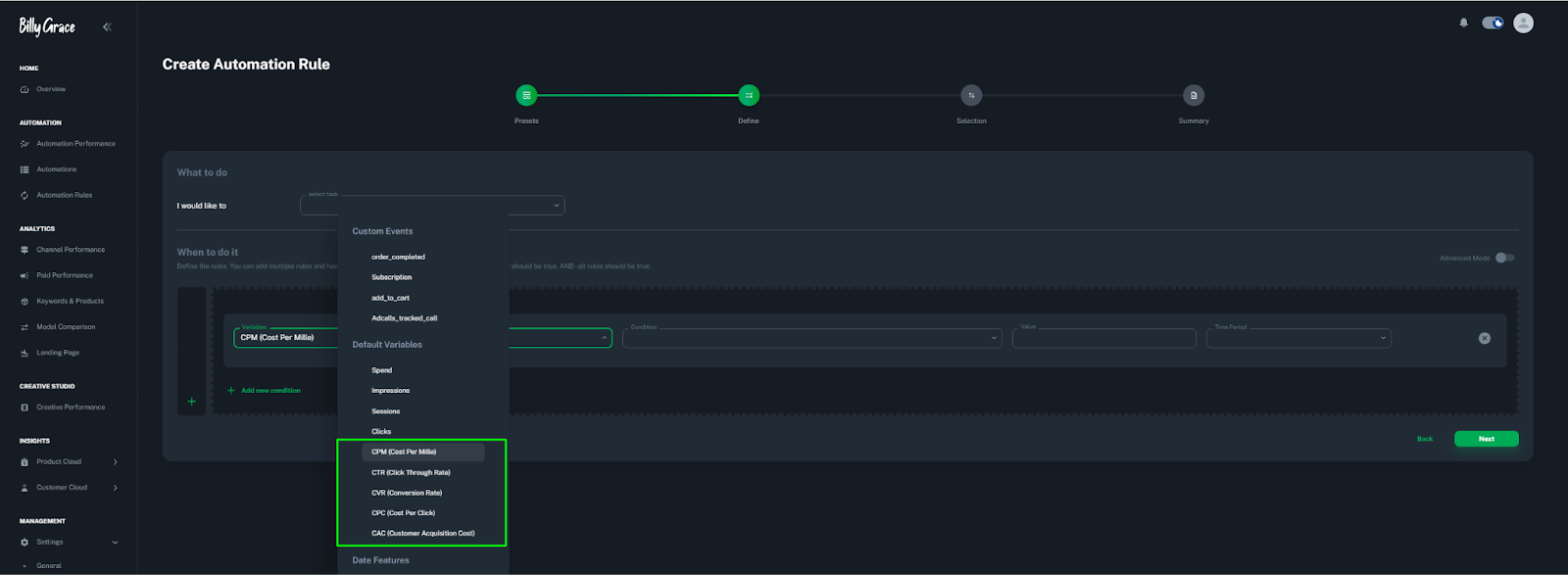
Added new variables to Automation Rules 🔡
In the same dropdown as shown above we have added multiple variables on which you can steer your campaigns through automations. With these metrics, you can add conditions like; if CPC is equal/ greater/ less than X amount in the selected period, increase or decrease daily budget.
We have added the following metrics:
- CPM (Cost per Mille)
- CTR (Click Through Rate)
- CVR (Conversion Rate )
- CPC (Cost per Click)
- CAC (Customer Acquisition Cost)
NEW: Pixel Release Notes page 📜
For enhanced transparency, we have added a new page where you can find the latest release updates regarding the Billy Pixel.

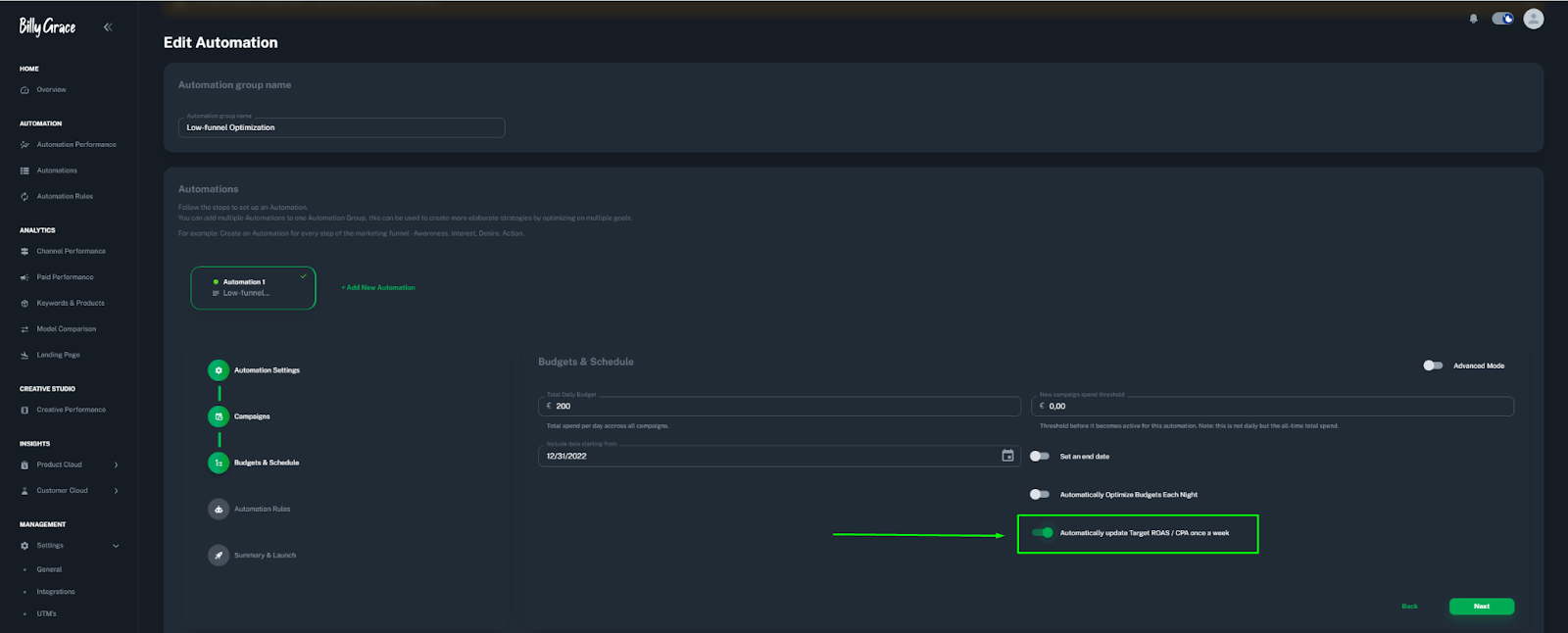
Enhanced automation with Target ROAS/CPA switch 🤖
Take control of your campaign optimization with our latest update to the automation form. With the Target ROAS/CPA switch, you can now automatically update your target ROAS/CPA once a week based on our algorithm's recommendations.
Additional amazing improvements 🚀
- Search bar added in the metrics dropdown for improved navigation and selection.
- 🛠️ Stay tuned! We are actively working behind the scenes on integrating with Salesforce Commerce Cloud and Channable. More updates coming soon!

Feature update
Product update
Product update February 🚀
Shared by Charlotte
• March 07, 2024
Hey there,
Our new product update has arrived 🙌
Hopefully, everyone had an amazing extended February!
Read on to learn what we improved in February 2024.
NEW FEATURE: Campaign Analysis Page 📈
To enhance your campaign monitoring capabilities, we've added a new "Campaign Analysis" page, accessible from the Paid Performance section. This page offers insights into Campaign Trends & Journeys, within this feature, you are able to compare campaigns from different platforms based on any metric. Enabling you to make data-driven decisions for campaign optimization.
To view the Campaign Analysis page, click on the magnifying glass next to the campaign name.

Click the button below to read more and watch a video with a report walkthrough.
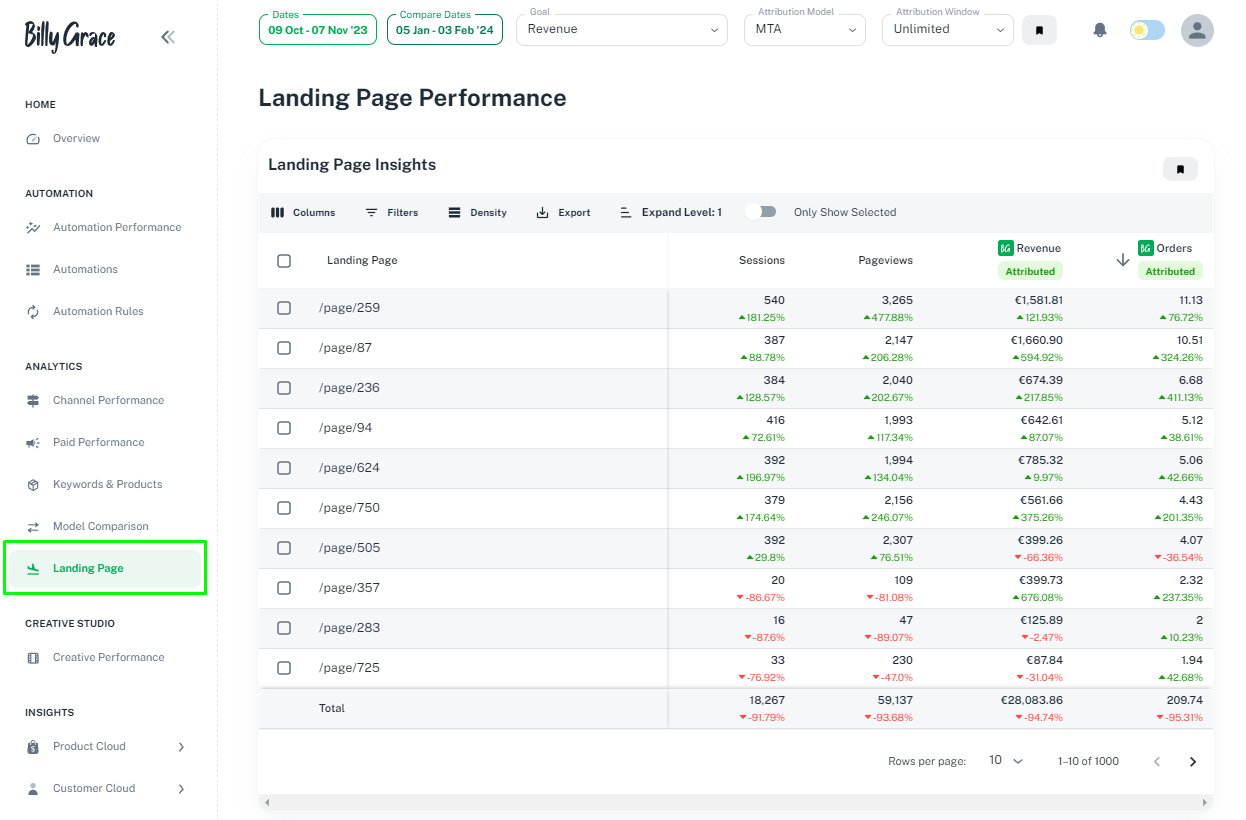
NEW REPORT: Landing Page 🛬
To provide you with detailed insights into the performance of your landing pages, we've added a new "Landing Page Report" page. This feature allows for a deeper analysis of user engagement and conversion rates. Check it out here.
NEW: Pixel Menu Added ⚙️
We've introduced the Pixel Menu, which includes the Pixel snippet code, and troubleshooting for pixel issues. This addition makes managing and optimizing your tracking pixels easier for more accurate campaign data.
You can now filter IP addresses in the settings to exclude internal traffic or unwanted visits from your analytics, ensuring that your campaign metrics accurately reflect user interactions.
Check it out here.

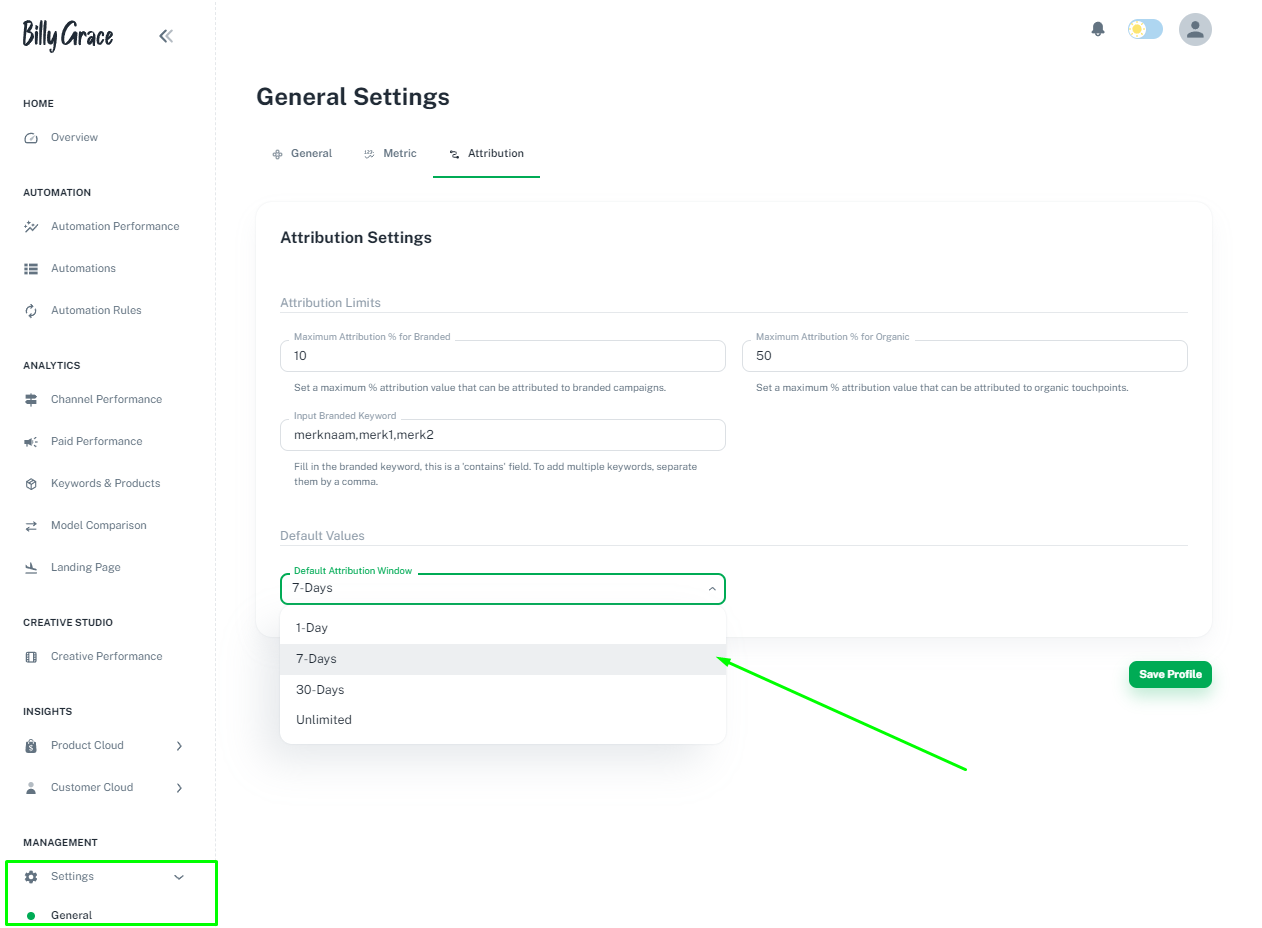
Attribution window default setting 🎛️
You can now set a default Attribution window at the account level for consistent reporting across campaigns. If you want to check it out for yourself, go to general settings -> Attribution settings
Additional amazing improvements 🚀
- Cost-per-click column (CPC) added to Products & Keywords.
- Total Selected Budget Displayed at "Budget" Step in Automation Form
- We moved metric-type goals from variables to a metrics dropdown.
- 🛠️ Stay tuned! We are actively working behind the scenes on integrating with Salesforce Commerce Cloud, Channable and Criteo. More updates coming soon!

Feature update
Product update
Product update January 🚀
Shared by Charlotte
• February 08, 2024
Hey there,
The product update of January has arrived 🙌
Read on to learn what we improved in January 2024.
NEW INTEGRATION: WooCommerce 🔥
We now have an integration with WooCommerce, contact us to get access and integrate your WooCommerce store. The integration will:
- Make order and customer journey tracking more accurate:
- Add New Customer & Returning Customer metrics, including CLV metrics to reports and Automations;

Budget upscale parameter 📈
We have added an option to the Budgets & Schedule step in the Automation creation form. When you toggle the "Advanced mode" in the top right corner, you can set the budget upscale threshold to your preference. The default is set to 20%, but you can set another percentage increase over the estimated maximum spend with this option. Go to Automations.

Integrated ad channel checkmark ✅
We have added a blue checkmark to the integrated marketing channels in Channel Performance and Model Comparison to make it clear which channel is connected and which channel is based on incoming UTM parameters.

NEW FEATURE: Troubleshoot pixel page 🕵️♂️
This feature is designed to assist you in identifying and resolving issues related to the pixel implementation. It also allows you to check UTM parameters and Custom Events in the last 7 days.
Go to the Troubleshoot Pixel page.

Multiple campaign filters 🧩
We now support adding multiple campaign filters. You can filter your paid campaigns by name and set a campaign filter to include/exclude campaigns (spend, results) by name. You can add up to 10 filters max.

Additional amazing improvements 🚀
- 🛠️ Stay tuned! We are actively working behind the scenes on integrating with Salesforce Commerce Cloud, and Channable. More updates coming soon!

Feature update
Product update
Product update December 🚀
Shared by Charlotte
• January 04, 2024
Hey there,
First, the best wishes for 2024! 🥂
Read on to learn what we improved in the last month of 2023.
Improved platform zoom 🔎
We have been working on a project that has been on our wish list for quite some time. The team at Billy Grace noticed that the elements on our platform appeared large, particularly on smaller screens, leading to excessive clicking and scrolling. In December, we released the new zoom. Now all elements, tables and graphs in the platform appear smaller. Our aim is that this adjustment provides a clearer overview and simplifies navigation through Billy Grace.
UTMs Update 💯
As time progresses we are looking for more ways to gather data, visualize in our platform and add automation functionalities to Automations and Automation Rules. To keep on adding these features, we use more data from paid advertising. For example, information about the placement of ads in Meta.
To gather this data we updated the UTM's of several channels, please check the UTM page and update your UTMs accordingly!
Updated tables: Checkbox selection ✅
We added checkboxes to table rows which can be selected and can be used to change the view of the row. This facilitates easier comparison between channels, campaigns or ad sets.

Additional amazing improvements 🚀
- We have introduced Customer Acquisition Cost (CAC) at the paid advertising level, enabling the display of CAC calculated as: Advertising Cost divided by the Number of New Customers who interacted with an ad.
- 🛠️ Stay tuned! We are actively working behind the scenes on integrating with WooCommerce, Salesforce Commerce Cloud, and Channable. More updates coming soon!

Feature update
Product update
Product update November 🚀
Shared by Charlotte
• December 11, 2023
Hey there,
The product update of November has arrived 🙌.
Read on to learn what we improved in November 2023.
Meta & TikTok Automations on campaign level 🤙
In the Automation creation, you can now only select campaigns. Our platform will detect if you have budgets on campaign or adset level and the recommendations will be given for the right level.

NEW CHANNEL: DV360🔥
We added the display & video network of DV360 to Billy Grace. Go to the authorization page and connect to DV360 now. Don't forget to add the right UTMs for DV360.

New variables in Automation Rules 🎆
We added: impressions, sessions, clicks, and e-commerce metrics: new customers, new customer revenue, returning customers, returning customer revenue to the variables in Automation Rules. Next to the new variables, we added new conditions that check on percentage changes over time. So, for example:

Use these variables as checks to carry out tasks. Create a new Automation Rule now. Want to know how to use Automations in combination with Automation Rules? Learn more here.

NEW INTEGRATION: Magento2 (Beta) 🚀
We now have an integration with Magento2 (Adobe Commerce), contact us to get access and integrate your Magento store. The integration will:
- Make order and customer journey tracking more accurate;
- Add New Customer & Returning customer metrics, including CLV metrics to reports and Automations;
Export tables to Excel/CSV 📁
Based on client feedback we improved the Export functionality, you now also have the option to export tables to XLSX files.

Date features in Automation Rules 📅
We added Day of the week / days in the month as variables in Automation Rules. You can now for example set a rule that will increase the daily budget of selected campaigns if the date of the month is during salary payout - 23rd till 27th.

Additional amazing improvements 🔥
- Integrated E-commerce stores now have Customer Lifetime value metrics, read more here.
- We added selection checkboxes to table rows to make it easier to compare certain channels, campaigns, ad sets or ads with each other.
- Improvements in Automation Creation, we added the total daily budget of the campaigns you have selected, making it easier to create an Automation;
- Improvements to Custom event Creation;
- UX improvements throughout the platform;

Feature update
Product update
Product update October 🚀

Shared by Tim
• November 03, 2023
Hey there,
The product update of October has arrived 🙌.
Read on to learn what we improved in October 2023.
NEW FEATURE: Target Metrics recommendations
The Billy Grace algorithm now gives recommendations on Target ROAS / CPA In Automations with Google Ads campaigns that have a target ROAS / CPA set.
Billy Grace can help you find the sweet spot of the perfect Target ROAS / CPA in relation to the budget you want to spend. Read more here

Add multiple Google Ad Accounts
It is now possible to add multiple Google Ads accounts to one Billy Grace account, creating a total overview of all advertising efforts. You can select multiple account IDs or even add an extra MCC account.
Do you have multiple ads accounts you want to connect to Billy Grace? Get in touch via the in-app messenger.

NEW CHANNEL: Outbrain 🔥
We added the display network of Outbrain to Billy Grace. Go to the authorization page and connect Outbrain now.

NEW FEATURE: Automation Rules results page 🔎
We have a new Automation Rules results page in Automation Performance.
On this page, you can now view detailed information about your Automation rules and their execution.
In the overview table, you can find the rules that are part of the selected automation.
And in the History table, you can find which rules are triggered.
The “Show Insights” button gives you insights into why a rule is triggered. What were the conditions and are they met or not? Read more here

Additional amazing improvements 🔥
- Added the status of connected channels on the authorization page;
- Added a doesn't contain option to table filtering;
- 🛠️ Behind the scenes we are working hard on the integrations with Magento & WooCommerce
Reach out to us if you would like to connect these to get more insights into new & returning customers!